
It is not always about the sheer willpower. Sometimes you need the right tools and strategies to manage your time and work. While earlier paper and sticky notes were all the hype in the productivity space, the modern workspace is going digital and so are the tools. Modern software solutions help you to simplify complex workflows and keep your teams all on the same page.
Here are nine approaches to boost productivity at your workplace, supplemented by the latest tools to make your workday much smoother.
Here is everything you need to know.
Plan projects effectively with a project planner
Top pick: GanttPRO
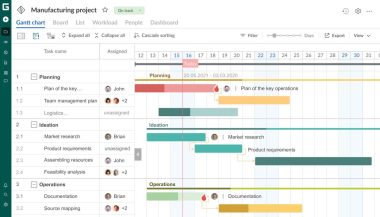
Managing multiple tasks, deadlines, and dependencies will require a clear overview. GanttPRO is a Gantt chart software online that allows teams to visualize projects from start to finish. Effectively plan your tasks, track deadlines, and assign tasks. Get a full picture of project progress at a glance.
Its Gantt charts show tasks, dates, dependencies, assignees, and more. So nothing gets overlooked. Switch between views like grid, board, list and more for more high-level visualization options. The platform also includes resource management, budget tracking, time logging, and templates for those recurring projects to keep things simple and accessible.
Plus, there is also a mobile app that keeps you connected on the go. Your teams can collaborate in real-time and ensure everyone knows what’s next and how changes affect the overall plan.
Use GanttPRO to reduce miscommunications, prevent missed deadlines, and maintain 100% transparency across complex projects. The result is less frightening and more mindful execution and delivery.
A simpler project management alternative
Top pick: Trello
If you don’t need a heavyweight PM tool and need something super lightweight with basic collaboration features, try out Trello. One of the oldest names in the space, Trello breaks your tasks into visual boards and cards. Its Kanban-style layout turns tasks into organized, color-coded units that move from “To Do” to “Done.” Assign due dates, attach files, add labels, and comment in real time.
Trello is brilliant if you need simplicity. You can track personal goals, while teams can collaborate on campaigns, content schedules, or product launches. Drag and drop functionality makes it super easy to get started. Plus, you also have integration options with popular third party apps like Google Drive, Slack, and more. This helps bring all project elements into one cohesive workflow.
Get started in a few simple clicks with the incredible free plan on offer that gives you access to unlimited boards, lists, and cards.
Manage your to-dos with a to-do list app
Top pick: Todoist
When you have an actionable workday ahead of you, you need to break it down into digestible to-dos to stop feeling overwhelmed. While pen and paper work great, a digital app can make things much easier. Capture your tasks from any device and schedule as per requirements.
Todoist remains a top choice. This award-winning productivity app turns your to-do lists into actionable schedules. You can add tasks, set deadlines, assign priorities and organize them across Kanban, list, or calendar views. Plus, the natural language input is great. It lets you quickly capture tasks, for example, typing or saying “Submit project tomorrow 10 pm,” automatically creates a task with a custom due date. No need to manually assign each property.
Todist is available on almost every major platform, including Windows, Mac, Android, and iOS. So managing your todos becomes seamless wherever you are. Todoist integrates with Google and Outlook calendars, too, so all your tasks show up there, too.
Todoist also comes with a team collaboration feature, but usability is limited so we suggest sticking with a proper PM tool to manage all your projects.
Make meetings more productive with smarter AI tools
Top pick: Fellow
Meetings are a huge time blocker. More often than it consumes more time than it saves. From planning your agenda and meeting structure to preparation and follow up, things can take away a lot from your workday. Offload all to a powerful AI assistant with Fellow. With Fellow, you can create collaborative agendas, capture notes, and receive post-meeting recaps automatically.
Integration with over 50 tools, including team messengers, PM tools, and more, helps sync meeting data across platforms. The AI assistant can answer questions about past discussions, track action items, and even help you automate post-meeting emails. This is sure to save you tons of manual hours.
Fellow is great at turning your chaotic meetings into more structured sessions by automating note-taking and follow ups. Save a whole lot of time and ensure decisions translate into actionable tasks and keep projects on track without additional administrative overhead.
Organize your email the smart way
Top pick: Shortwave
Emails are essential to your workflow. There is no two way about it. With tons of emails to read, reply and archive, the unread counter can shoot up quite quickly if left unchecked. You need smarter solutions to take care of it. Shortwave is a great choice. It consolidates your personal and work email accounts and combines AI with triage tools to group emails into contextual groups like travel, finance, newsletters, and so on to allow easy prioritization of tasks.
The AI assistant is great at summarizing emails, scheduling calendar events, and finding all your important messages minus the endless manual searching. Even with the limited free plan, you get tons of features to reduce your inbox clutter.
Shortwave is a great pick. Free your cognitive resources by minimizing the time spent on managing email and focus more on high-priority tasks, improving workflow efficiency, and reducing the constant stress of overflowing inboxes.
Take a more creative approach to your note taking
Top pick: Capacities
Traditional note-taking often falls short in today’s workplace. They fail to capture relationships between ideas. Capacities focuses on objects like people, meetings, or projects, and lets you build structured notes around them. This object-based system creates a web of interrelated insights, making information retrieval intuitive and contextual.
Markdown support, optional local storage, and PKM (personal knowledge management) features allow you to manage personal ideas and work notes seamlessly. By connecting work notes seamlessly. By connecting notes to relevant projects or people, Capacities ensure your knowledge is actionable, not just stored.
If you are someone who judges complex ideas, Capacities is your ultimate option to turn your scattered thoughts into structured knowledge. A great way to reduce cognitive load and increase efficiency in decision-making.
A unified approach to managing all your calendars
Top pick: Vimcal
Juggling personal and professional calendars can create scheduling conflicts. Vimcal consolidates all your calendars and adds AI-powered features to streamline booking. You also get an in-built “Focus Mode” that helps you concentrate on specific meetings and templates for recurring events.
A really cool feature is the “Free Time Finder.” It is a nice-to-have feature that by itself determines the most suitable time for your meetings, considering your breaks too. Sharing team availability allows your teams to work smoothly together, and time management tools such as Pomodoro timers help to keep the focus during work blocks. Use Vimcal to bring together calendar management and avoid double booking. Make sure that your day stays productive without needing to continuously adjust it manually.
Plan your week mindfully
Top pick: Sunsama
Finding yourself spending too much time juggling between multiple apps? What you need is an all-in-one platform to bring it all together. Sunsama is your ultimate daily planner that integrates all your tasks from multiple apps into a single weekly view. It’s great at pulling in all your work from your calendar, to-do list, PM, and more to help you organize your priorities more efficiently.
Sunsama is great at proactive planning. Transform a chaotic workflow into a deliberate sequence of tasks, giving you clarity and control over how your week unfolds.
Make collaboration more fun with visual whiteboards
Top pick: Kosmik
Some projects need more than lists and calendars. Visual collaboration is key. Kosmik offers an infinite canvas where teams can combine PDFs, web pages, images, and notes. AI auto-tags objects, subjects, and colors, making search more intuitive.
Teams are able to annotate, comment, and link the captured content to its origin. Working together with Figma, Notion, and Pinterest is a wonderful option to explore and design workflows. Kosmik’s approach lets ideas evolve visually and makes problem solving and brainstorming a team collaborative effort.
Kosmik makes it easy to turn your abstract concepts into interactive visuals for better planning and decision-making. Let your teams stay aligned and productive without losing sight of context.
Work smarter with the right tools
Working hard does not automatically mean success. But working smarter does. From planning your complex projects to managing your entire workweek, there is a tool for everything. You just need to find the right one to balance out your workload and make things a bit easier. Use these approaches together to transform a fragmented workday into a streamlined, productive experience.
Note: Some tools on this list do not come with a free tier. Check out their official pricing pages to find out more.
Written by Evelina Brown